
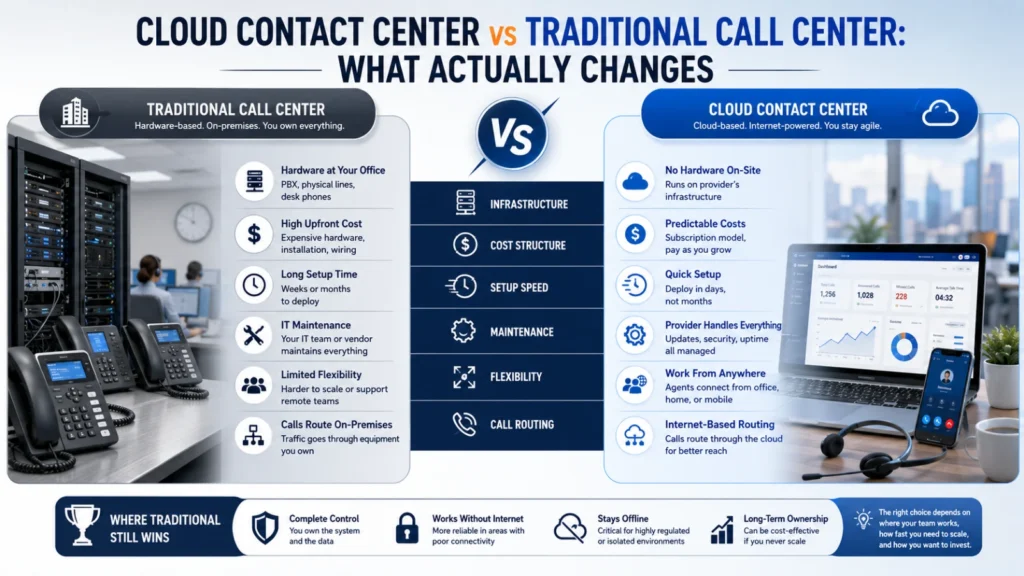
Most businesses replacing a phone system compare feature lists. That rarely reveals the real difference.
The genuine gap is not features. It is cost structure, setup speed, and where your team can physically work.
Here is an honest comparison, including where traditional systems still win.
What a Traditional Call Center Actually Is
A traditional call center runs on hardware installed at your office. That usually means a PBX, physical lines, and desk phones.
Everything sits on your premises. Your IT team or a vendor maintains it directly.
Calls route through equipment you own. That ownership brings both control and responsibility.
What a Cloud Contact Center Actually Is
A cloud contact center runs on a provider’s infrastructure instead. Your team connects over the internet.
Agents use a browser, desktop app, or mobile app. No PBX hardware sits in your office.
You pay a subscription rather than buying equipment. The provider handles maintenance and updates.
Side-by-Side Comparison
| Factor | Traditional Call Center | Cloud Contact Center |
|---|---|---|
| Upfront cost | High capital expenditure | Low or none |
| Setup time | Days to weeks | Hours to days |
| Adding users | New hardware or licences | Minutes, no hardware |
| Remote work | Difficult or impossible | Built in |
| Channels | Voice, usually only | Voice, WhatsApp, SMS, email, chat |
| CRM integration | Custom development | Usually native |
| Reporting | Basic or add-on | Standard dashboards |
| Maintenance | Your responsibility | Provider’s responsibility |
| Upgrades | Manual, often disruptive | Continuous, usually invisible |
| Internet dependency | Low | High |
| Data location control | Full | Depends on provider |
Upfront Cost Works Very Differently
Traditional systems require buying hardware before handling a single call. Budget approval often delays projects for months.
Cloud systems shift that spend to a monthly subscription. Costs scale with team size instead of arriving upfront.
Neither model is automatically cheaper long term. Cloud is simply easier to start and easier to stop.
Setup Time Is the Most Visible Difference
Installing a PBX involves engineers, cabling, and scheduling. Weeks can pass before agents take calls.
Cloud systems are configured through a dashboard. Many teams go live within a day.
For a growing business, that difference is operational, not just administrative.
Scaling Up and Down
Traditional systems scale in fixed increments. You buy capacity ahead of need, then hope demand arrives.
Cloud systems add or remove users almost instantly. Seasonal teams and BPO ramp-ups become straightforward.
Scaling down matters too. Traditional hardware you no longer need still cost money.
Remote and Hybrid Teams
This is where traditional systems struggle most. A desk phone assumes someone sits at that desk.
Cloud systems work anywhere with internet access. The same business number reaches the agent regardless of location.
Teams stop relying on personal mobiles. Call records stay complete.
Channels Beyond Voice
Traditional call centers handle voice well and little else. Email and messaging usually live in separate tools.
Cloud contact centers unify voice, WhatsApp, SMS, email, and chat. Agents see one conversation history per customer.
In the UAE, WhatsApp is often the preferred channel. Voice-only systems miss a large share of enquiries.
CRM Integration
Connecting a legacy PBX to a CRM usually needs custom development. That work is expensive and fragile.
Cloud platforms typically integrate natively with major CRMs. Call data syncs without manual entry.
VOYCELL integrates with CRMs including Zoho, HubSpot, Salesforce, Pipedrive, Bitrix24 and Freshdesk.
Reporting and Visibility
Traditional systems report call volume and duration. Deeper analysis often requires exports and spreadsheets.
Cloud platforms include dashboards as standard. Managers see queue length, response times, and agent performance live.
Better visibility changes decisions. You cannot fix what you cannot see.
Maintenance, Upgrades and Downtime
Hardware ages, and someone must maintain it. Firmware updates and repairs fall to your team.
Cloud providers handle maintenance centrally. Upgrades usually arrive without any action from you.
The trade-off is control. You accept the provider’s release schedule.
Where Traditional Systems Still Make Sense
This section matters for an honest comparison.
On-premise remains reasonable in a few situations:
- Strict requirements that data never leave your building
- Unreliable or limited internet connectivity
- Recent, substantial investment in hardware not yet depreciated
- Highly specialised integrations already built and working
Some providers also offer hybrid deployment. That can bridge both models during transition.
What to Check Before Migrating
Migration questions matter more than feature comparisons:
- Can existing business numbers be ported across?
- How much downtime does the switchover involve?
- Where is call data stored and processed?
- What internet bandwidth and redundancy does the team need?
- What happens to historical call recordings?
Ask for a trial rather than a demo. Real workflows expose what presentations hide.
The UAE Context
UAE businesses often serve customers across multiple languages and time zones. Teams are frequently distributed across emirates.
Local virtual numbers still matter for trust. Cloud providers can supply Dubai, Abu Dhabi and Sharjah numbers.
VOIP is regulated in the UAE. Confirm any provider’s regulatory position before committing.
The Bottom Line
Cloud contact centers win on speed, flexibility, channels, and scaling. Traditional systems win on direct control and internet independence.
Most growing businesses now choose cloud for practical reasons. The exceptions are real but narrow.
Decide based on how your team works, not on feature counts.
Frequently Asked Questions
What is the main difference between cloud and traditional call centers?
Traditional systems run on hardware in your office. Cloud systems run on a provider’s infrastructure over the internet.
Is a cloud contact center cheaper than a traditional one?
Upfront, almost always. Long term depends on team size, usage, and how long hardware would have lasted.
How long does cloud contact center setup take?
Often hours, sometimes a day or two. Traditional installations typically take weeks.
Can I keep my existing phone numbers?
Usually yes. Most providers support number porting, though timelines vary by country and carrier.
Do cloud contact centers work without reliable internet?
No. Internet quality directly affects call quality. Assess bandwidth and backup connectivity before migrating.
Are traditional call centers still worth using?
Sometimes. They suit strict data-residency rules, poor connectivity, or recent hardware investment not yet depreciated.
Can remote agents use a cloud contact center?
Yes. Agents log in from anywhere and use the same business number and features.
Does a cloud contact center handle WhatsApp and SMS?
Most do. Traditional systems generally handle voice only, with messaging in separate tools.
What is hybrid deployment?
Hybrid combines on-premise and cloud components. It can ease migration or satisfy specific data requirements.
How much downtime does migration cause?
Usually minimal when planned properly. Run both systems briefly in parallel to avoid missed calls.
Is cloud calling legal in the UAE?
VOIP is regulated in the UAE. Confirm your provider’s regulatory position and current rules before committing.


