
Sales teams lose deals when calls go unlogged in Salesforce. Manual data entry eats time reps could spend selling. Voycell’s Salesforce integration syncs every call automatically, so nothing gets missed. This guide covers how the integration works and why it matters for sales teams.
Why Manual Call Logging Fails Sales Teams
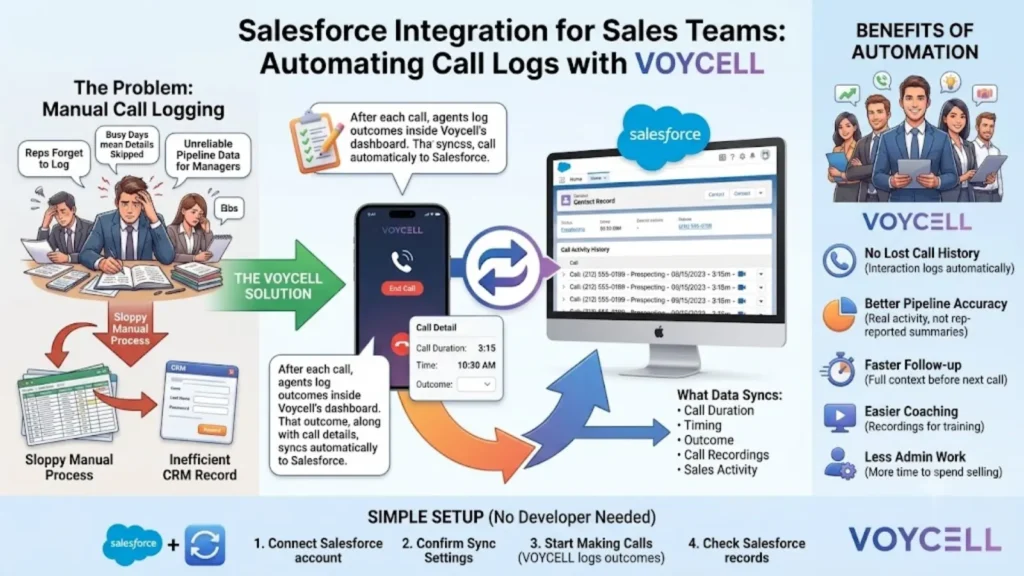
Reps forget to log calls after back-to-back conversations. Busy days mean details get skipped or logged incorrectly. Missing call history makes pipeline data unreliable for managers. Salesforce only stays accurate if every call actually gets recorded.
How the Voycell Salesforce Integration Works
Voycell connects directly with Salesforce as one of its 100+ supported CRMs. After each call, agents log the outcome inside Voycell’s dashboard. That outcome, along with call details, syncs automatically to Salesforce. No manual copying between systems is required at any step.
What Data Syncs from Voycell to Salesforce
Voycell tracks call duration, timing, and outcome for every interaction. Managers can see which agent contacted which lead directly. Full call recordings stay accessible for training and review. All of this data lands against the correct Salesforce record.
Why Speed Matters Before the Call Even Syncs
Voycell aims to reach new prospects within 30 seconds. Faster contact means leads are less likely to go cold. Once connected, the call outcome flows straight into Salesforce. Speed and accurate logging become one connected process.
Benefits of Automating Call Logs with Salesforce
Connecting Voycell to Salesforce changes how a sales team operates day to day.
- No lost call history — every interaction logs against the right deal automatically.
- Better pipeline accuracy — managers see real activity, not rep-reported summaries.
- Faster follow-up — reps see full call context before their next conversation.
- Easier coaching — recordings support training without extra manual steps.
- Less admin work — reps spend less time on data entry after calls.
How to Set Up the Voycell Salesforce Integration
Setup is designed to be simple, without needing a developer.
- Connect your Salesforce account — link it directly inside Voycell’s dashboard.
- Confirm your sync settings — choose what call data should sync automatically.
- Start making and receiving calls — Voycell logs outcomes as calls happen.
- Check Salesforce records — confirm call details land on the right deals.
- Adjust settings as needed — refine once your team uses it daily.
Conclusion
Manual call logging leaves gaps that hurt Salesforce data over time. Voycell’s Salesforce integration closes that gap automatically, call by call. Outcomes, duration, and recordings all land on the right record. This keeps your pipeline accurate without adding admin work for reps. Connect Voycell to Salesforce to see how it fits your sales process.
FAQ
Does Voycell integrate directly with Salesforce?
Yes, Salesforce is one of Voycell’s 100+ supported CRM integrations. Calls sync automatically once both accounts are connected.
What call data syncs from Voycell to Salesforce?
Call outcomes, duration, and recordings sync to the right record. This happens automatically after each call ends.
Do sales reps need to manually log calls in Salesforce?
No, Voycell automatically syncs call details after each call. This removes the need for manual data entry.
How does faster call response affect the sales pipeline?
Voycell aims to connect new leads within 30 seconds. Faster contact means fresher, more accurate pipeline data.
Can managers review call recordings through this integration?
Yes, full call recordings are accessible through Voycell’s dashboard. This supports coaching without extra manual steps.
Is the Voycell Salesforce integration difficult to set up?
No, it’s designed for teams without dedicated technical support. Accounts connect directly inside Voycell’s dashboard.


